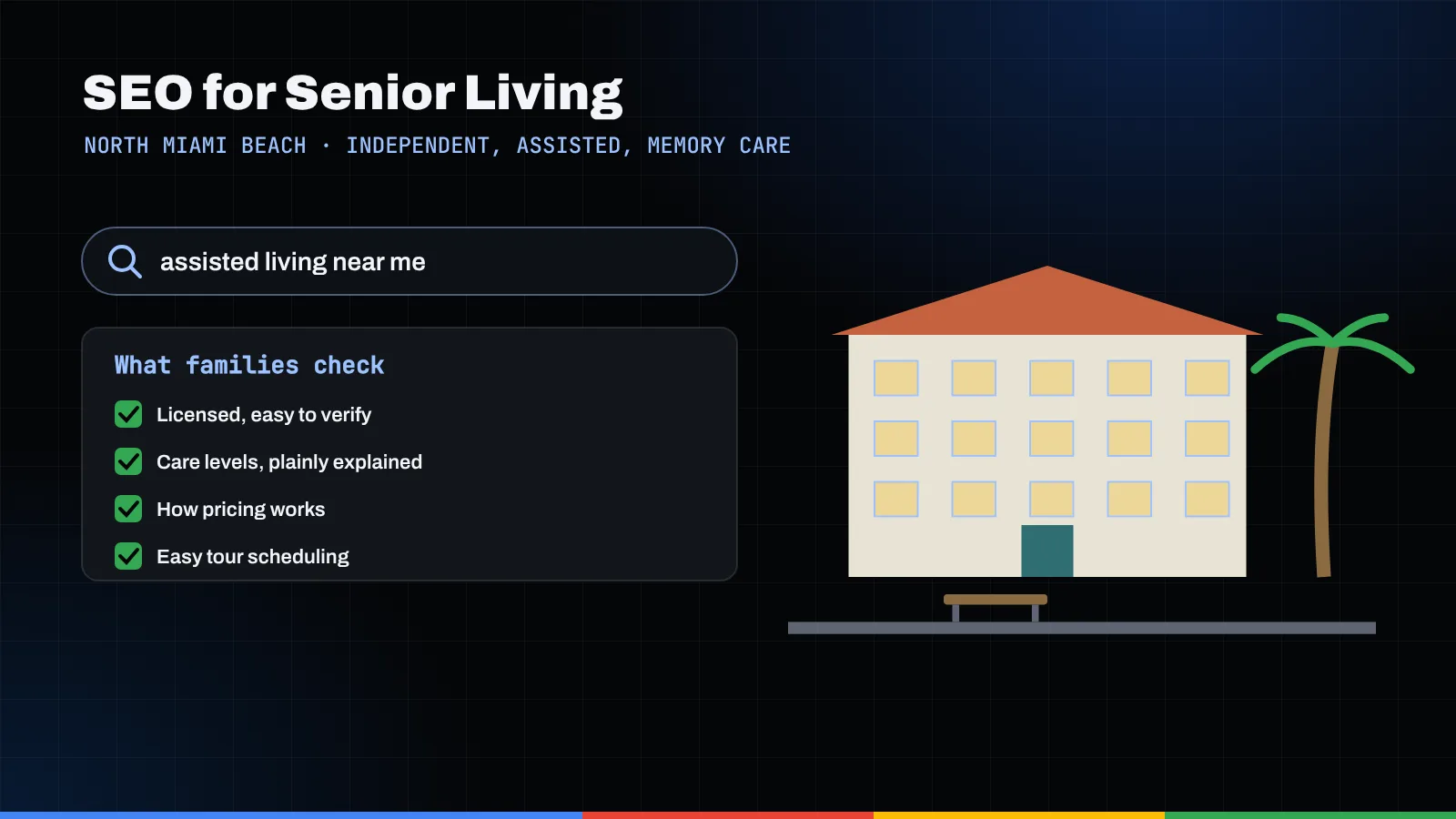
Good SEO for senior living works like a well-run family tour. Your website and Google Business Profile should answer what a worried adult child asks, roughly in the order they ask it: what the place looks like, what the apartments are, what a normal day feels like, what care is provided, how licensing and pricing work, and how to reach a real person. Build a clear page for each stop and make your Florida license easy to verify.
Key takeaways
- Families research senior living in stages, so give each stage a page: overview, floor plans, daily life, care levels, pricing and licensing, and contact.
- Care-level pages for independent living, assisted living, memory care and respite stays should use plain language and match what your license allows.
- Florida assisted living facilities are licensed by AHCA under Chapter 429 of the Florida Statutes. Show your license and point families to FloridaHealthFinder.
- A pricing page can be honest and useful without a number you can't stand behind.
- No incentives for reviews, and written consent before any resident appears on your site.
How do families actually search for senior living?
Picture a Saturday morning. A daughter we'll call Marisol is parked outside a community with her father, Ernesto. He's in his eighties, still sharp, a little unsteady since a fall last spring. She has a list of questions on her phone. They're about to take a tour.
That tour really started weeks earlier, late at night, on a phone screen. Marisol searched "assisted living near me," then "memory care North Miami Beach," then "difference between assisted living and independent living." She read floor plans on her lunch break and checked whether the place was licensed. By the time she called, she had already toured the website the same way she was about to tour the building.
That's the idea behind SEO for senior living: your website is the first tour. Every room a family would want to see in person deserves a page, written with the patience a good community director brings to a walk-through. Below, we follow that tour using a hypothetical community we'll call Seagrape Terrace. It isn't a real place, and Marisol and Ernesto are an illustration, not a real family.
One note on scope: this post covers communities where residents live. If your organization sends caregivers into private homes instead, that's a different set of searches, covered in our guide to home care agency SEO.
The lobby: your homepage and Google Business Profile
The lobby is where a family decides whether to keep walking. Online there are two lobbies, and many families see your Google listing in the map results before they ever reach your homepage.
Get the Google Business Profile right
Google's guidelines for representing your business are worth reading closely. The points that matter most here:
- Use your real-world name. "Seagrape Terrace" is fine. "Seagrape Terrace Best Assisted Living & Memory Care North Miami Beach" is not.
- Use as few categories as possible. Google asks you to describe what the business is, not every service it offers, and not to use categories as keywords.
- One profile per location. Don't create extra profiles for each care level inside the same building.
- List hours someone answers the phone or gives tours, not the 24-hour care schedule.
Our Google Business Profile guide for North Miami Beach goes deeper on photos, posts and Q&A.
Let the homepage orient, not overwhelm
A good lobby has a person at the desk and a clear sense of where things are. In the first screen, say what Seagrape Terrace is ("assisted living and memory care in North Miami Beach"), show a real photo of the building, give a phone number that rings a person, and offer a way to book a tour. Then point to the rooms: floor plans, daily life, care levels, pricing and contact.
Family question: "Is this somewhere Dad would actually want to live?" The homepage can't answer that alone, but it can make the pages that do easy to find.
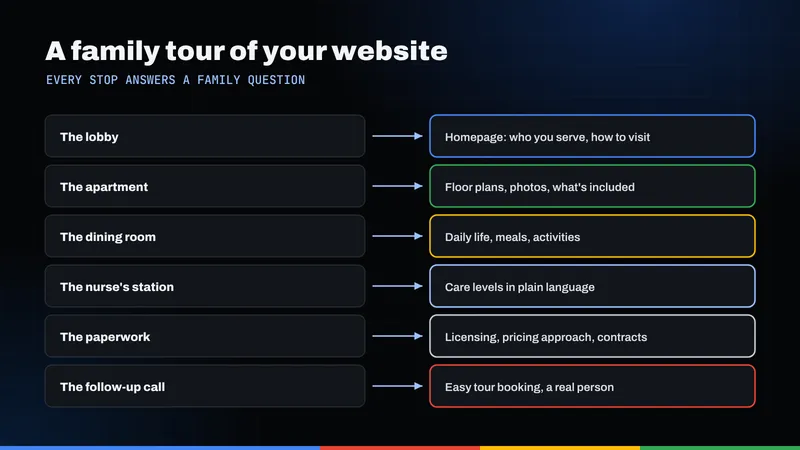
The apartment: floor plans that answer real questions
The apartment is where Ernesto finally gets interested. Where does his recliner go? Is there a walk-in shower? Does the window get morning light? Marisol wants to know about grab bars, call systems and whether a couple can share a unit.
For each apartment type, a floor plans page should include:
- A floor plan drawing with approximate dimensions
- Real photos, labeled as a model unit if that's what they show
- Bathroom, kitchenette, storage and window details
- Safety features such as call systems, if you have them
- Whether furniture, pets or a second resident are allowed, and which care levels the unit serves
Write in sentences, not a spec sheet. "The studio fits a full bed, a recliner and a small dresser" helps a family more than a square-footage table. If availability changes often, say "call for current availability" instead of leaving an old banner up.
Family question: "Can Mom and Dad stay together if only one of them needs help?" If you can accommodate that, give it its own short section.
The dining room: showing what a normal day feels like
In the dining room, families watch residents more than décor. Are people talking? Is someone helping the woman with the walker to her seat? Online, a single bulleted "Amenities" page can't carry that. A few focused pages do better:
- Dining: how meals work, how special diets are handled, a sample menu labeled as a sample, and whether families can join for lunch.
- Activities: what a typical week includes. A sample calendar helps only if it reflects what actually happens.
- Language and culture: North Miami Beach is a multilingual community, and families often want to know whether staff speak their parent's language. If you have that capacity, say so and consider translated pages; our post on multilingual SEO in North Miami Beach explains how.
- Transportation: whether you provide rides to appointments or shopping, and how scheduling works.
Skip stock photos of models laughing over salads. Families can tell. Real photos of your dining room and courtyard do more, provided any residents shown have given written permission.
The nurse's station: care-level pages explained plainly
This is where Marisol slows down. What happens if Dad needs more help next year? Who handles his medications? What if he starts to wander?
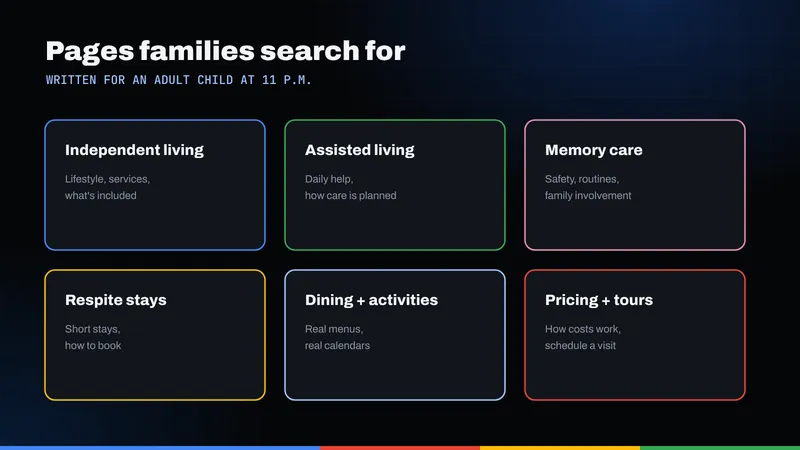
Care-level pages are the heart of assisted living SEO because they match the searches families make while sorting out their options. Give each level its own page, written for someone who has never done this before:
- Independent living: who it's for, what's included, and whether personal care is available and how.
- Assisted living: the daily help offered, such as bathing, dressing and medication assistance, plus how care plans are created and reviewed.
- Memory care: who it's designed for, how the environment and routines differ, and how staff are trained. Describe what you do, not what you promise.
- Respite stays: short stays while a parent recovers or a family caregiver takes a break. Explain minimum length, what's included and how to arrange one.
Make the pages match your license
Florida assisted living facilities are licensed by the Agency for Health Care Administration (AHCA) under Chapter 429 of the Florida Statutes. Section 429.07 lists the license categories: standard, extended congregate care, limited nursing services and limited mental health. A facility can hold one or more.
If Seagrape Terrace holds only a standard license, its care pages shouldn't describe services that require a specialty license. If it holds one, explain plainly what that means for residents and name it on the page. Have your administrator review every care page before it goes live.
Family question: "If Dad's needs change, will he have to move out?" Explain how reassessments work and what happens when needs go beyond what you can provide. A straight answer earns more trust than a vague promise.
Which pages should a senior living community build?
Start from the questions families ask on tours, think about how those become searches, then build a page for each.
| Family question | What they search | Page to build |
|---|---|---|
| What kind of help does Dad need? | difference between independent and assisted living | Care levels overview |
| Is there a good place nearby? | assisted living North Miami Beach | Homepage and location page with address and map |
| Mom's memory is slipping. What now? | memory care near me | Memory care page |
| I need a break after Dad's surgery. | short term respite stay assisted living | Respite stays page |
| What will the apartment look like? | assisted living floor plans | Floor plans page |
| What does it cost, and what's included? | assisted living cost what's included | Pricing page |
| Is this place licensed and inspected? | assisted living license lookup Florida | Licensing page with state lookup links |
| Can Medicaid help pay? | Medicaid assisted living Florida | Payment options page |
You don't need all of these at once. Start with care levels, pricing and licensing, where families are closest to deciding. Our local SEO services page explains how pages like these fit into a broader local plan.
The paperwork: pricing, licensing and payment options
Every tour ends at a desk with forms, and this is where many senior living websites go quiet. "Contact us for pricing" alone leaves families bracing for a sales pitch.
Pricing pages without invented numbers
You don't need a rate card to be helpful. Explain what the monthly fee includes, what changes the cost (apartment size, care needs, a second resident), what's billed separately, how care assessments affect pricing, and whether there's a community fee. If you publish a starting price, keep it current and say what it covers. A stale figure is worse than none.
Make licensing easy to verify
Put your AHCA license number on a licensing or about page and in the footer, then show families how to check it. AHCA's consumer site, FloridaHealthFinder, has an assisted living facility search by name, city, ZIP code or license number, and AHCA explains how to find inspection reports. Linking to your own record can feel exposing, but it signals confidence, and families who look will find it anyway.
Payment options and Medicaid
Florida's Statewide Medicaid Managed Care Long-Term Care program lists assisted living among the services it can provide. According to AHCA's Long-Term Care program FAQs, applicants must be 18 or older, need a nursing facility level of care as determined by the Department of Elder Affairs' CARES program, and meet financial eligibility set by the Department of Children and Families. Screening starts with the local Aging and Disability Resource Center, and there may be a waitlist.
Say plainly whether you accept residents through Long-Term Care plans, and which ones. Don't imply coverage you can't confirm; link to the state and let families read the rules.
Family question: "What happens if Dad's savings run out?" If you have a policy, explain it. If it depends, say on what.
Reviews, resident privacy and avoiding scare tactics
Google's prohibited and restricted content policy bars paid or incentivized reviews, selectively asking only happy customers, and reviews from people with a conflict of interest, including current or former employees. So no gift cards and no asking staff to post. A consistent, friendly request to every family after a few months is fine.
When you reply to a critical review, acknowledge the concern, invite a call, and never discuss a resident's health in public. A calm reply protects the resident and reassures the next family reading.
Real photos and stories beat stock images, but residents aren't props. Get written consent before any resident's photo, name or story appears on your site, Google profile or social media, make withdrawal easy, and act on it promptly. For memory care residents, involve the person legally authorized to decide for them. Let your administrator and counsel set the policy.
Finally, skip the fear. Headlines about falls and decline may get clicks, but they don't build trust with someone like Marisol, who is already worried. Write the way you'd talk to a family in your lobby: calm, specific and kind.
What schema markup fits a senior living community?
Schema markup helps search engines read facts like your name, address, phone and hours. Google's local business structured data documentation says to use the most specific LocalBusiness subtype possible, with name and address required.
The catch: schema.org has no "AssistedLiving" or "SeniorLiving" type. The LocalBusiness family includes MedicalBusiness and LodgingBusiness, but neither fits a residential community precisely. In practice:
- Use LocalBusiness as the base for name, address, geo, phone, URL and tour hours.
- Be careful with MedicalBusiness. Don't use it to suggest medical care you don't provide.
- Mark up only what's visible on the page.
- Skip self-serving review markup. Google notes review properties on local business pages are meant for sites that capture reviews about other businesses.
For background, see how schema helps search engines.
The follow-up call: turning a visit into a conversation
That night, Marisol compares notes. The community that calls back the next morning, remembers Ernesto's name and answers the question she forgot to ask stays on the list. Your site should make that conversation easy to start:
- Offer more than one way in: a phone that rings a person, a short tour form, and text messaging if you can staff it.
- Keep forms short and never ask for medical details on a web form.
- Say what happens next, such as "our community director will call within one business day," then make sure it happens.
- Track which pages lead to tours so you know what to improve.
If the site looks good but tours aren't coming in, the gap is often the path from page to phone call, which is where thoughtful website design helps more than more pages.
The same tour structure works across Miami-Dade; our SEO Miami services cover the wider market, and our North Miami Beach SEO page explains how we work close to home. Most good local SEO in Miami comes down to what Marisol wanted: clear answers, honest information and a real person on the line. Want a second set of eyes? Request a free audit and we'll take the tour with you.
Frequently asked questions
What is SEO for senior living?
It's helping families find and understand your community when they search. That means an accurate Google Business Profile, clear pages for care levels, floor plans, daily life, pricing and licensing, and an easy way to book a tour.
Should each care level have its own page?
Yes. Families search for independent living, assisted living, memory care and respite stays differently. Separate pages let you explain each plainly, as long as every page reflects what your license allows.
Who licenses assisted living facilities in Florida?
The Agency for Health Care Administration (AHCA), under Chapter 429 of the Florida Statutes. License categories include standard, extended congregate care, limited nursing services and limited mental health. Families can look up facilities on FloridaHealthFinder.
Do we have to publish prices on our website?
No, but explain what the monthly fee includes, what affects cost and how care assessments work. If you post a starting price, keep it current and only post a number you will honor.
Can we post resident photos and stories?
Only with written consent from the resident or the person legally authorized to decide for them. Make withdrawal easy, remove content promptly when asked, and have your administrator or counsel set the policy.