A North Miami Beach business owner should track SEO KPIs in four tiers: visibility (Search Console impressions, clicks, CTR and average position, plus Google Business Profile views and actions), engagement (GA4 key events and site health), conversion (leads, lead-to-customer rate, cost per lead) and revenue. A useful SEO report puts those tiers on one page, compares each month to the same month last year, and explains what changed and what happens next.
Key takeaways
- Organize SEO KPIs as a chain: visibility leads to engagement, engagement leads to conversions, conversions lead to revenue. A report that stops at visibility is only a quarter of the story.
- Use Google's own definitions. Impressions, clicks, CTR and average position in Search Console each mean something specific, and each one is easy to misread on its own.
- For a local business, Google Business Profile calls, direction requests and website clicks often matter as much as website traffic.
- Two simple formulas, lead-to-customer rate and cost per lead, turn SEO reporting into numbers an owner can make decisions with.
- Google now shows generative AI impressions (AI Overviews and AI Mode) in a separate Search Console report. Watch it, but read it as an early signal, not a scoreboard.
Why do most SEO reports miss the point?
Think of an SEO report like an income statement. Revenue at the top means little until you see the lines below it. A chart showing "traffic up" is a top-line number; without the lines underneath, you cannot tell whether the business got any better.
Most reports owners receive have one of three problems:
- They report activity, not outcomes. "We published four posts and built ten links" is a list of inputs. Inputs belong in the report, but they are not KPIs.
- They pick metrics that only go up. Keyword counts across irrelevant terms or third-party "visibility scores" can rise while phone calls fall.
- They skip the money. If nobody connects search activity to leads and customers, the owner cannot judge whether the spend is working.
A key performance indicator should pass a simple test: if it moves, would you change something? If the answer is no, it is a supporting metric at best.
The four-tier SEO KPI framework
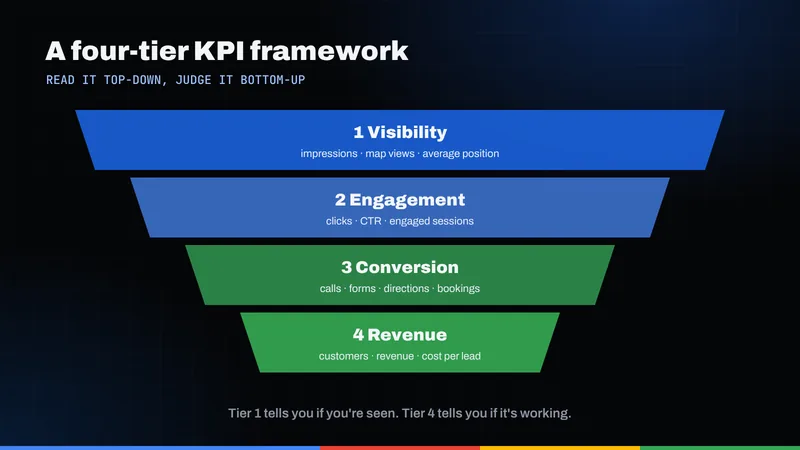
Useful SEO KPIs trace the path from a search to a sale. We use four tiers, each depending on the one above it.
- Visibility. Are you showing up when people search? Measured in Google Search Console and Google Business Profile.
- Engagement. When people arrive, do they take meaningful actions? Measured in Google Analytics 4 (GA4) through key events, with site health as a supporting check.
- Conversion. Do those actions become real leads, and do leads become customers? Measured in your call tracking, CRM, booking system or even a spreadsheet.
- Revenue. What are those customers worth, and how does that compare with what you spend? Measured in your accounting or sales records.
The tiers also show where to look when something breaks. If visibility rises but engagement falls, check the page or the query match. If engagement is healthy but conversions are flat, look at the offer, the phone handling or the form.
Tier 1: What do the Search Console visibility metrics actually mean?
Google Search Console is the primary source for organic visibility because the data comes from Google itself. The Search Console Performance report defines its four core metrics this way:
- Clicks: the number of times a user clicked through to your site from Google Search results.
- Impressions: how many times your site appeared in search results.
- CTR (click-through rate): clicks divided by impressions.
- Average position: the average position of the topmost result from your site. In the table view, it reflects the specific page or query in that row.
Impressions are exposure, not demand
Impressions mean your site appeared, not that anyone cared. A page can collect impressions for loosely related searches far outside North Miami Beach. Rising impressions are a reasonable early sign, but the weakest evidence of progress on their own.
CTR falls when you start ranking for more things
Because CTR is a ratio, it can drop for healthy reasons. If your site starts appearing for many new queries at lower positions, impressions grow faster than clicks. Read CTR by query or page, not just the site-wide total.
Average position is an average
Average position blends every query you appear for. A new, broad term at a deep position can drag the average down while your valuable local terms improve. Filter to a short list of priority queries, such as your core service plus the city.
The metric that matters most here is clicks from relevant queries: the first point where a searcher chose you.
Tier 1, local layer: Which Google Business Profile metrics count?
For a business serving customers in North Miami Beach, some search activity never touches the website. People call, request directions or tap through from the map listing. That is why local SEO in Miami and its neighboring cities has to be reported with Google Business Profile data alongside Search Console. If your profile needs work, our guide to Google Business Profile in North Miami Beach covers the basics.
Google's help page on Business Profile performance lists the metrics and how they are counted:
- Views: how many people viewed your profile on Search and Maps. Google counts unique visitors, at most once per person per day.
- Searches: the search terms people used to find your profile, refreshed monthly.
- Calls: the number of times a customer clicked the call button on your profile.
- Directions: how many people asked for directions to your business.
- Website clicks: clicks on the website link on your profile, counted per click rather than per person.
- Messages and bookings: distinct message conversations and completed bookings, where those features apply.
Two caveats matter. First, Google says the data includes both organic results and Google Ads, so if you run ads, profile actions are not purely an SEO result. Second, a call-button tap is not a completed call, and a directions request is not a visit. These are strong intent signals, one step before an actual lead.
Tier 2: How should engagement be measured in GA4?
Once a visitor lands on your site, Google Analytics 4 measures what they do through key events. Google defines a key event as "an event that measures an action that's particularly important to the success of your business." You decide which events qualify and mark them in GA4's admin settings.
For most local service businesses, good key events include:
- Form submissions that reach a thank-you or confirmation state
- Clicks on a phone number link (a tap to call from a mobile page)
- Booking or appointment completions
- Quote or estimate requests
Page views, scroll depth and time on page usually should not be key events. They describe browsing, not business value. Google's help page on marking key events makes a related point: marking a generic event such as page_view as a key event would count every pageview as a key event.
The KPI at this tier is key events from organic search, ideally split between organic search and Business Profile website clicks. The supporting ratio is the key event rate: key events divided by sessions from organic search.
Site health as a supporting metric
Engagement also depends on whether the site loads and responds well. Google's Core Web Vitals give you three measures with published "good" thresholds: Largest Contentful Paint within 2.5 seconds, Interaction to Next Paint of 200 milliseconds or less, and Cumulative Layout Shift of 0.1 or less, each assessed at the 75th percentile of page loads. Treat these as a monthly pass-or-fail health check, not a growth KPI. Our post on how website speed affects revenue explains why this matters commercially.
Tier 3: Which conversion formulas should you calculate?
This is the tier most SEO reporting skips, and it answers the owner's real question. A key event signals that someone tried to contact you. A lead is a real person with a real need. A customer is a lead who paid. You need two simple formulas to connect them.
Lead-to-customer rate = new customers from organic leads ÷ qualified organic leads
Cost per lead = monthly SEO investment ÷ qualified organic leads
"Qualified" matters. A spam form fill or a wrong-number call is a key event, but not a lead. Someone needs to tag inquiries by source and quality, even in a simple spreadsheet.
Worked example (illustrative)
Imagine a home services company in North Miami Beach. These numbers are hypothetical and rounded for clarity, not drawn from any real client or benchmark.
- Monthly SEO investment: $2,000
- Organic leads logged in the month (calls, forms, profile calls combined after removing spam and duplicates): 40
- Of those, qualified leads: 25
- New customers who came from those qualified leads: 5
Lead-to-customer rate = 5 ÷ 25 = 20% (illustrative).
Cost per qualified lead = $2,000 ÷ 25 = $80 (illustrative).
Cost per customer = $2,000 ÷ 5 = $400 (illustrative).
Now, instead of debating rankings, the owner can ask whether $400 to acquire a customer is acceptable given what a customer is worth. It also shows where to push: improving the lead-to-customer rate through faster callbacks may be cheaper than generating more leads. That is the logic behind conversion optimization as a companion to SEO.
Tier 4: How do you tie SEO to revenue?
The final tier converts customers into dollars. The cleanest version is:
Organic revenue = new customers from organic leads × average first-job (or first-order) value
Continuing the illustrative example: if those 5 customers average $1,000 on their first job, organic revenue is $5,000 against $2,000 of investment.
Three cautions keep this tier honest:
- Timing: SEO work often produces leads months later. Judge return over a quarter or longer. Our article on how long SEO takes sets realistic expectations.
- Attribution: A customer may see your map listing, visit the site twice and call a week later. Ask new customers how they found you.
- Margin: Revenue is not profit. Apply your margin before comparing it to the budget.
SEO KPI reference table
Here is the framework on one page. "Directionally good" means the trend you want over time, not a benchmark; compare against your own history.
| KPI | Where to find it | Directionally good | Common misread |
|---|---|---|---|
| Clicks (relevant queries) | Search Console, Performance report, filtered by query | Rising year over year for your service and location terms | Counting clicks from irrelevant or out-of-area queries as wins |
| Impressions | Search Console, Performance report | Rising, especially early in a program | Treating exposure as proof of demand or revenue |
| CTR | Search Console, by query and page | Stable or rising on your core queries | Panicking when site-wide CTR dips because you rank for more terms |
| Average position | Search Console, filtered to priority queries | Improving on a short list of money terms | Reading the site-wide average as a single "ranking" |
| Profile calls, directions, website clicks | Google Business Profile, Performance | Rising year over year | Forgetting the data includes Google Ads activity |
| Organic key events | GA4, key events by session source | Rising, with a steady or rising key event rate | Marking page views or scrolls as key events |
| Core Web Vitals | Field data checked against web.dev thresholds | Passing at the 75th percentile | Treating a speed score as a growth metric |
| Qualified organic leads | Call tracking, CRM or a lead log | Rising as a share of all leads | Counting spam and duplicates as leads |
| Lead-to-customer rate | CRM or sales records | Stable or rising | Blaming SEO for problems in follow-up |
| Cost per lead and per customer | Calculated from budget and lead log | Falling over a quarter or more | Judging it on a single month |
What about AI Overviews and AI search visibility?
Google's documentation on AI features and your website states that sites appearing in AI Overviews and AI Mode are included in overall search traffic in Search Console, reported within the "Web" search type of the Performance report. The same page says there are no additional requirements to appear in these features beyond being indexed and eligible to show with a snippet.
Google has also added a dedicated generative AI performance report for Search. According to Google's help page, it covers AI Overviews and AI Mode, and Google says it rolled these insights out to all websites worldwide as of August 31, 2026. Read it carefully:
- It reports impressions, defined as how many times links to your site were shown in a generative AI feature on Google Search. The help page does not describe clicks, CTR or position for this report.
- The report may not appear for a site that lacks enough generative AI impressions.
- The newest data may be preliminary and can change.
Add AI impressions to the visibility tier as a watch item: note the trend and which pages earn them, but keep judging success on leads and revenue. Visibility in tools like ChatGPT is harder to measure directly. Our AI search optimization service explains how we approach it.
What does a useful monthly SEO report look like?
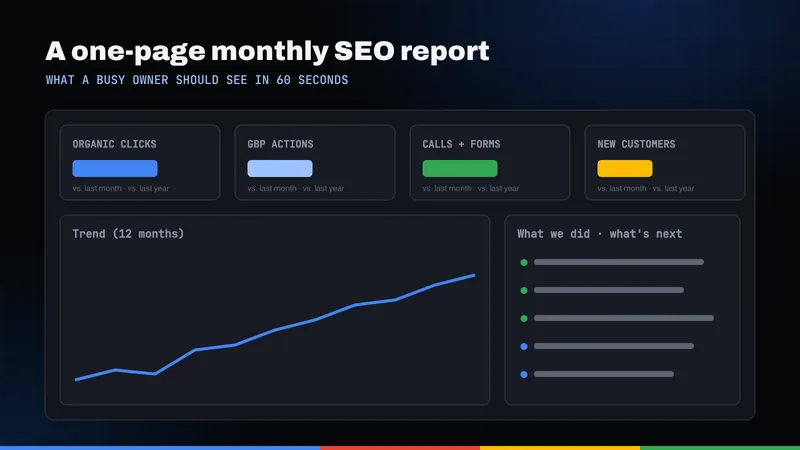
A good report fits on one or two pages, leads with outcomes and explains itself. Here is a sample layout.
| Section | What it contains | Comparison |
|---|---|---|
| 1. Summary | Three sentences: what happened, why, what is next | Not applicable |
| 2. Revenue and conversion | Qualified organic leads, new customers, lead-to-customer rate, cost per lead | Same month last year, plus trailing three months |
| 3. Engagement | Organic key events by type (calls, forms, bookings) and key event rate | Same month last year |
| 4. Local visibility | Business Profile views, calls, direction requests, website clicks | Same month last year |
| 5. Search visibility | Clicks, impressions, CTR and average position for a fixed list of priority queries; generative AI impressions as a watch item | Same month last year |
| 6. Site health | Core Web Vitals pass or fail, indexing issues, anything broken | Last month |
| 7. Work completed | Pages published or improved, technical fixes, profile updates | Planned versus done |
| 8. Next month | Two to four priorities tied to a specific KPI | Not applicable |
Three design choices make this work:
- Outcomes come first. The order runs from revenue down to visibility, because that is the order of importance to the owner.
- Year-over-year comparisons. Many businesses have seasonal swings. Comparing October to last October controls for season; comparing it to September may not.
- A fixed query list. Pick your priority searches once, such as your service plus "North Miami Beach," and keep the same list so the trend is meaningful.
If you are comparing SEO services in Miami or locally, ask to see a sample report before you sign. Our post on choosing an SEO company in North Miami Beach lists other questions worth asking. You can also see how we structure SEO and local SEO engagements, or read about our North Miami Beach SEO work. If you would like us to review your current tracking setup and tell you which of these KPIs you can already measure, request a free audit.
Frequently asked questions
What are the most important SEO KPIs for a small local business?
Start with qualified leads from organic search, lead-to-customer rate and cost per lead, because those connect directly to revenue. Support them with Search Console clicks on priority queries, Google Business Profile calls and direction requests, and GA4 key events such as form submissions and phone clicks.
How often should I review SEO reporting?
Review the numbers monthly and take a deeper look each quarter. SEO results build over time, so judge return over a quarter or longer rather than a single month.
Why did my CTR go down when my traffic went up?
CTR is clicks divided by impressions. When your site starts appearing for many new queries, often at lower positions, impressions can grow faster than clicks, which lowers CTR even though total clicks are rising. Check CTR on your priority queries instead of the site-wide total.
Can I see whether my site appears in Google AI Overviews?
Google's Search Console help documentation describes a generative AI performance report that shows impressions from AI Overviews and AI Mode. It may not appear for sites without enough generative AI impressions, and the help page does not describe clicks or position for that report, so treat it as a visibility signal.
Do Google Business Profile metrics only measure SEO results?
No. Google states that Business Profile performance data includes activity from both organic results and Google Ads. If you run ads, keep that in mind when you credit profile calls or website clicks to SEO.