SEO for photographers means giving Google words, structure and proof to go with your pictures. Build one focused page per session type you shoot, describe images with honest alt text and filenames, keep files light, embed your credit and copyright in the metadata, set up your Business Profile the way you really operate, and earn reviews without gaming them. A gallery alone is a well-exposed frame with nothing in focus for a search engine.
Key takeaways
- Treat your site like a shoot list: one page per session type (wedding, portrait, family, newborn, headshot, real estate, event), each with real text, real photos and clear next steps.
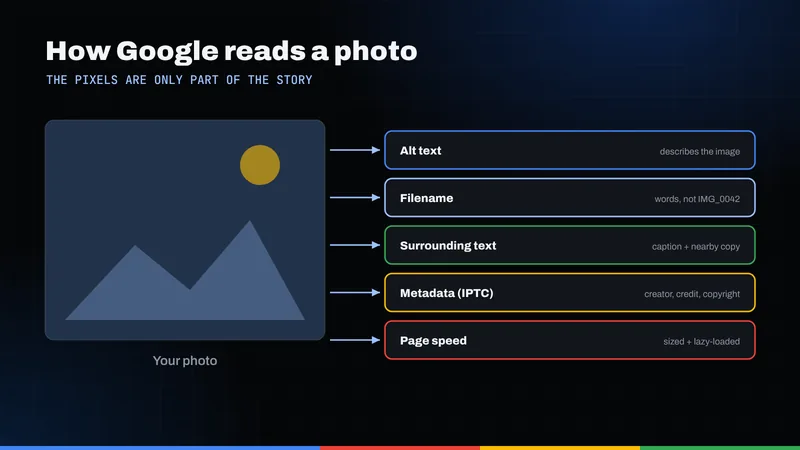
- Google reads alt text, filenames, captions and the words around an image to understand it, so a wall of untitled thumbnails gives it very little to work with.
- Serve properly sized images with
srcset, lazy-load everything below the fold, and never lazy-load the first big image on the page. - Google can show creator, credit and copyright details from IPTC metadata or image license structured data. Stop stripping that metadata on export.
- Location pages, model permissions and reviews only help if they're honest. Check park rules before you write about a spot, and never trade discounts for stars.
Why don't beautiful galleries rank on their own?
Every photographer I know has had this moment. The new site looks incredible, the light is right in every frame, and then nothing happens. Friends say it looks amazing. Google says very little.
Here's the frank part. A search engine doesn't see your photos the way a couple scrolling on a Sunday night does. It reads: the page title, the headings, the paragraphs near the image, the alt attribute, the filename, the caption. A page of 40 images and a "Book now" button is underexposed from Google's point of view.
That doesn't mean burying your work under paragraphs. It means each page needs one subject in sharp focus, framed by enough text to tell a stranger what they're looking at and why you're the person to call. It's a big part of why beautiful websites so often fail to convert.
What's on the shoot list of pages to build?
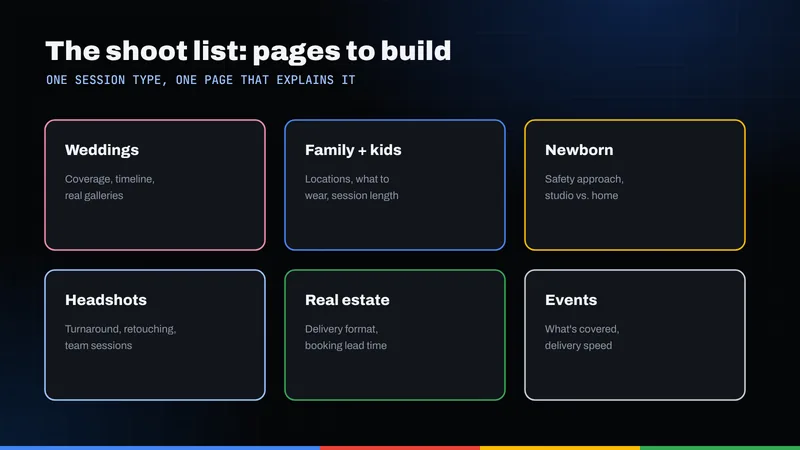
Plan it like a wedding day. If you sell it and people search for it, it deserves its own page. Lumping weddings, newborns and headshots onto one "Services" page is like shooting a whole event on one focal length: you get something, but not your best work for any of it.
| Session type | Page to build | What it must include |
|---|---|---|
| Wedding | Wedding photography page | Your approach to the day, coverage options or a clear "packages start at" note if you publish pricing, a few full stories (not just highlights), timeline tips, travel area and how to check your date |
| Portrait | Portrait sessions page | Who it's for (seniors, couples, personal branding), what to wear, how long a session runs, indoor vs. outdoor options and how images are delivered |
| Family | Family sessions page | Best times of day, what to expect with young kids, group size limits, location ideas you've actually shot and a short prep checklist |
| Newborn | Newborn photography page | When to book relative to the due date, how you handle safety and posing, what the parents do during the session, studio or in-home details |
| Headshot | Headshots page | Individual vs. team options, on-site setup, turnaround time, retouching scope and examples across different industries |
| Real estate | Real estate photography page | What's included (interiors, exteriors, twilight, aerial if you're licensed for it), how listings are prepped, delivery format and turnaround |
| Event | Event photography page | Event types you cover (corporate, mitzvahs, galas, birthdays), coverage hours, same-day previews if you offer them and how you work with planners and venues |
Each page gets a unique title, one clear H1, an intro naming the service and the area you serve, your strongest images for that category, a few FAQs in your own words and a visible way to inquire. If you rarely book a category, skip it.
Your homepage becomes the cover shot, linking down into each service. For the bigger picture on how pages, profile and reviews fit together for local SEO in Miami and the surrounding cities, our local SEO overview walks through it.
What does Google actually want from your images?
Google publishes its own image SEO best practices. Treat them as your pre-shoot checklist.
Alt text that describes, not stuffs
Google calls alt text the most important attribute for describing an image, and it matters for screen reader users too. Write something specific to the image; Google warns that keyword stuffing creates a bad experience and can be treated as spam.
- Weak:
alt="wedding photographer miami wedding photography best wedding" - Better:
alt="Bride and groom laughing under a mangrove canopy during golden hour"
Describe what's in the frame. You don't need the phrase "photography SEO" anywhere in your alt text.
Filenames you'd recognize
Google's example is plain: a descriptive name like my-new-black-kitten.jpg beats IMG00023.JPG. So rename DSC_4471.jpg to something like newborn-wrapped-in-cream-blanket.jpg; most editing software can batch-rename on export.
Page context and captions
Google uses captions and the surrounding page content to understand an image. A newborn image on a newborn page, next to a paragraph about newborn sessions, is easier to understand than the same image floating in a mixed gallery.
Image sitemaps
If your gallery loads images with JavaScript, Google may miss some. An image sitemap lists the image URLs on each page so Google can find them, including images served from a CDN. Many platforms generate these automatically; check yours first.
How big should your photos be on the website?
Photographers fight this one hardest. But a 6,000-pixel JPEG on a phone screen is like printing a billboard to hand someone a business card.
Google's web performance site, web.dev, explains how to serve responsive images: create several sizes of each image, list them in srcset with width descriptors, and use sizes to tell the browser how wide the image will display. web.dev notes that serving desktop-sized images to mobile devices can use two to four times more data than needed.
- Export multiple sizes. Three to five widths per image is common.
- Use modern formats where your setup supports them. Google Search supports WebP and AVIF alongside JPEG and PNG.
- Lazy-load below the fold, not above it. web.dev's guide to browser-level lazy loading says to add
loading="lazy"to offscreen images but to avoid it on images visible when the page first loads, especially the largest one. - Always set width and height. The same guide explains that dimensions let the browser reserve space, which prevents the page from jumping around as images arrive.
Clients browsing on a phone will leave a page that stutters. More on that in how website speed affects revenue.
Can Google show your name and copyright on your photos?
In some cases, yes. This is the part of photography SEO most people skip, and it protects your work as well as promoting it.
According to Google's documentation on image metadata in Google Images, Google can display creator, credit and copyright information, and a "Licensable" badge, when it finds that information either in IPTC photo metadata embedded in the file or in structured data on the page. You only need one of the two.
The IPTC route
Google lists these IPTC fields:
- Creator, Credit Line and Copyright Notice (recommended) for who made it and who owns it.
- Web Statement of Rights, a URL to your license terms, which is required for the Licensable badge.
- Licensor URL (recommended), pointing to where someone can license the image.
IPTC travels with the file, so one metadata preset in your editor puts your name on every export. Google discourages removing metadata to shrink file size and recommends keeping the creator, credit line and copyright notice. If your export or compression settings strip it, change them.
The structured data route
On the page, you can describe an image with schema.org ImageObject. Google requires contentUrl plus at least one of creator, creditText, copyrightNotice or license; for the Licensable badge, license is required and acquireLicensePage is recommended. If the two sources disagree, Google says it uses the structured data. Display isn't guaranteed. If you're new to markup, start with how schema helps search engines.
The Licensable badge only matters if you actually license images, say real estate photos to agents. For most portrait and wedding work, creator and copyright are the useful part.
How do you write location pages without faking it?
The temptation is to spin up "Best Photo Spots in [Every Town in South Florida]" pages with stock descriptions and recycled images. They rarely help, because they show no first-hand experience.
Write only about places you've actually shot, with your own images and details you learned on site. Take Oleta River State Park at 3400 N.E. 163rd St. in North Miami Beach. A useful page would cover what you know firsthand: where the light is soft at what time, where the summer shade is, what to wear for uneven ground.
Be accurate about the rules, too. Florida State Parks' visitor FAQs say photography is permitted without a fee for all purposes except where normal park operations are disrupted or resources need protecting. A permit is required if a photo shoot will affect park visitors or resources, that you should allow at least seven days for the permit to be processed, and that liability insurance is required. Standard entrance fees apply. For a paid session with props or a large group, contact the park well ahead and confirm what applies, and say so on your page.
The test for any location page: could only you have written it?
Get client permission before you post
This isn't legal advice; talk to an attorney about your contracts. But as common sense: put portfolio and marketing use in writing up front and let clients opt out easily. With children and newborns, leave out full names, schools and anything that hints at where a family lives. Honor "keep it private" requests, and check whether venues have their own preferences about publishing images taken there. A session you can't publish can't become a blog story, so ask early.
Studio or service-area: how should your Business Profile be set up?
For "photographer near me" searches, your Business Profile often shows before your site. Setup starts with one honest question: do clients come to you?
Google's Business Profile guidelines draw the lines:
- Service-area photographer (you travel to clients and work from home): hide your address and set a service area.
- Studio photographer (clients come to you): show the address, as long as it's staffed and able to receive customers during stated hours.
- Hybrid (a studio for newborns and headshots, plus on-location weddings): show the address and designate a service area, with the same staffing condition.
Also: use your real-world business name with no added keywords, no P.O. boxes or remote mailboxes, and as few categories as possible. For a deeper walkthrough, see our Google Business Profile guide for North Miami Beach.
What should a photographer blog about?
Google's guidance on creating helpful content asks, in its self-assessment questions, whether content provides original information, shows first-hand expertise and leaves readers satisfied. It also says Google has no preferred word count.
That rules out "Another beautiful session!" posts with 60 images and two sentences. It rules in posts that answer what clients actually ask:
- "What should our family wear for beach photos?" with examples from your own sessions
- "How we plan a wedding day timeline around sunset" for couples still choosing a venue
- "What to expect at a newborn session" written from how you really run them
- "How to prep a condo for listing photos" for agents and owners
- A full session story that explains your decisions: why that light, why that spot, why that pose
Link each post to the matching service page. If weddings drive your book, see how venues approach search in our wedding venue SEO guide; planners and venues often become your best referral partners.
How do you get reviews without breaking the rules?
The gallery delivery email is an emotional moment, which makes it the natural time to ask. Just ask clean.
Google's policy on fake engagement prohibits offering incentives such as discounts or free goods for reviews, selectively asking only happy clients, discouraging negative reviews, and reviews based on a conflict of interest, including current or former employees. So no "leave five stars and get a free print," and no second-shooter reviewing your business.
Federal rules point the same way. The FTC's final rule announced in August 2024 bans fake reviews and testimonials (including AI-generated ones), incentives conditioned on positive or negative sentiment, undisclosed insider reviews and review suppression through threats or intimidation, and it lets the FTC seek civil penalties against knowing violators.
- Send every client the same review request with their gallery link, whether you think they loved it or not.
- Make it easy with a direct link to your Business Profile review form.
- Reply to every review, good or critical, calmly and specifically.
- Never write, edit or "suggest wording" for a client's review.
Where should a North Miami Beach photographer start?
Prioritize like you would on a tight shoot:
- Fix your Business Profile so it matches how you actually work.
- Build or rewrite your two highest-value session pages first.
- Rename, resize and add alt text to the images on those pages.
- Turn on metadata in your export preset so every file carries your credit.
- Start a review routine tied to gallery delivery.
- Publish one genuinely useful post a month.
None of it requires compromising your portfolio. If you'd rather someone handle the technical side while you shoot, our North Miami Beach SEO team and website design service build exactly this kind of structure for creative businesses. Want to see where your site stands today? Request a free audit and we'll walk through it with you.
Frequently asked questions
Do photographers really need text on their website for SEO?
Yes. Google reads page titles, headings, captions, alt text and the words around images to understand what a page is about. A focused intro, a few honest FAQs and descriptive alt text on each session page give Google something to work with without crowding your images.
Should a photographer show a home address on Google Business Profile?
Not if clients don't come there. Google says service-area businesses should hide their address and set a service area. Show an address only if you have a studio that is staffed and able to receive clients during its listed hours.
Does Google use photo metadata like copyright and creator?
It can. Google can display creator, credit and copyright information from IPTC photo metadata or from image license structured data on the page, though it doesn't guarantee it will appear. Google recommends keeping the creator, credit line and copyright notice in your files rather than stripping them.
Do I need a permit to photograph clients at Oleta River State Park?
Florida State Parks says photography is permitted without a fee except where normal park operations are disrupted, and that a permit is required if a shoot will affect park visitors or resources, with at least seven days for processing and liability insurance required. Contact the park ahead of a paid session to confirm what applies.
Can I offer a discount to clients who leave a review?
No. Google prohibits offering incentives such as discounts or free goods for reviews, and the FTC's 2024 rule bans incentives conditioned on positive or negative sentiment. Ask every client the same way, with nothing attached.