SEO for nonprofits comes down to three jobs: helping people who need your services find them, giving volunteers an easy way to say yes, and showing donors proof they can check for themselves. In North Miami Beach, most of that work costs staff time rather than money. Start with an accurate Google Business Profile, one plain-language page per program, a volunteer page with real dates, and a donation page that carries your IRS status and Florida's required disclosure.
Key takeaways
- Our website serves three audiences with different questions: people who need help, volunteers and donors. Each one needs its own page, written in their words.
- A Google Business Profile is free, but Google expects a staffed location or a real service area. A mailing address alone won't qualify.
- Use Event markup only for public, in-person events, each on its own page. Recurring office hours and members-only gatherings don't qualify.
- Donation pages earn trust with facts a donor can check: an IRS listing, our Florida registration number and the disclosure statement Florida law requires.
- Ask for reviews honestly, never pay or pressure for them, and never publish a beneficiary's story without clear consent.
Why should a nonprofit board care about search at all?
What follows is written as a memo an executive director might send to the board, so feel free to borrow it. To the board, from the director's desk: this is about how people find us, and why a little effort on our website and Google listing pays off in ways a grant report can show.
Every week, someone in North Miami Beach types a need into a phone. A parent looks for an after-school program. A retiree wants to give back on Saturdays. A family searches for a food pantry open today. A business owner checks whether a charity is legitimate before writing a check. If we don't show up, or show up with an outdated phone number, we lose people we exist to serve.
That is all SEO for nonprofits means: the right people finding accurate, useful information about us when they search. Most of the tactics below are tagged No-cost (staff or volunteer time only) or Low-cost (a small budget or a few hours of outside help). Nonprofit SEO follows the same rules as the local SEO Miami businesses depend on, and there's more on the local picture on the North Miami Beach SEO page.
Congregations have their own guide on SEO for churches and houses of worship. This memo is broader: charities, food pantries, youth programs, arts groups and community associations.
Who is our website actually for?
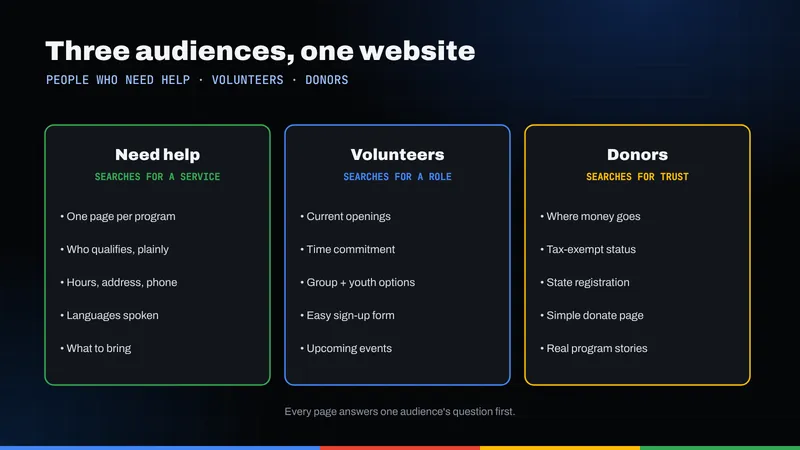
Most nonprofit websites are written for the board and funders. That's backwards for search. People don't type our mission statement into Google; they type their problem, their free time or their doubts about whether we're trustworthy. So we organize the site around three audiences.
| Audience | What they search (examples) | Page to build |
|---|---|---|
| People who need help | "food pantry open today near me," "free after-school program North Miami Beach," "help paying rent" | One page per program: who qualifies, what to bring, hours, address, languages spoken |
| Volunteers | "volunteer opportunities this weekend," "community service hours for students," "volunteer with kids near me" | A volunteer hub plus one page per recurring role and one page per public event |
| Donors | "[our name] reviews," "is [our name] legit," "donate food near me," "local charity to donate to" | A donation page with trust signals, an annual report or impact page, and a clear About page |
These searches are illustrations, not measured data. Before writing each page, check what Google suggests as you type; this keyword research guide goes deeper if a volunteer wants to own the task.
How should we set up our Google Business Profile?
No-cost. The Google Business Profile is our listing in Maps and search, with hours, phone, directions and reviews. For many people seeking help, it's the only thing they check before calling or walking in.
Google's guidelines for representing your business have no special nonprofit rules, so the general ones apply. These trip up charities most often:
- Staffed location or service area. If people come to us, Google expects a location our team staffs and that can receive people during posted hours. If we go to people (meal delivery, home visits), we can list as a service-area organization with one profile for our central office and a designated service area.
- No mailing-only addresses. Google says P.O. boxes or mailboxes at remote locations aren't acceptable, and a rented mailing address where we don't operate isn't eligible.
- Shared space. A desk in a co-working office needs clear signage and staffing during business hours.
- Distinct departments. A public-facing program that operates as a distinct entity, like a thrift store with its own entrance, can have its own profile. A weekly workshop can't.
Once eligible, keep the basics exact: the name on our sign and our IRS paperwork, the most specific category Google offers, the hours someone can actually reach a person, and holiday hours entered weeks ahead. The guide to Google Business Profile in North Miami Beach walks through every field.
What should a program page say to people who need help?
No-cost. This is the audience we exist for, and the one most nonprofit sites underserve. A "Programs" page full of mission language doesn't help a tired parent at 10 p.m. Give each program its own page, answering in this order:
- What it is, in one sentence a 12-year-old would understand.
- Who qualifies. Age, residency, income or referral rules, stated plainly. If there are no requirements, say so, because people often assume there are.
- What to bring. ID, proof of address, a reusable bag, nothing at all.
- When and where. Days, hours, street address, which door, parking and the nearest bus stop.
- Cost. "Free" is the most reassuring word on the page. Use it when it's true.
- Languages spoken by staff or volunteers on site.
- How to start. One clear next step: call, walk in or fill out a short form.
Write for dignity: describe the service, not the person, and skip phrases like "the needy." Short sentences and common words help everyone, including people reading in a second language. If the families we serve speak another language at home, translated program pages are among the most useful things we can publish; this multilingual SEO guide explains how to do it properly.
A few accessibility habits cost nothing: use real headings rather than bold text, describe images in their alt text, make sure links say where they go ("see pantry hours," not "click here"), and never put hours or eligibility rules only inside an image of a flyer.
How do we turn searches into volunteers?
No-cost to low-cost. Volunteers search by time and interest: this weekend, with kids, school service hours. A generic "Get involved" form rarely matches. Build a volunteer hub linking to one page per recurring role (pantry sorting, tutoring, event setup), each with the commitment, schedule, minimum age, background-check rules and coordinator's name.
Where Event markup helps, and where it doesn't
Event structured data tells Google an event's name, date and place, which can make it eligible for richer display in search. Google's Event structured data guidelines set firm limits, and they matter for us:
- Events must take place in a physical location. Virtual-only experiences aren't supported.
- Events must be open to the public. Membership or invitation-only events, like a donor reception, are ineligible.
- Don't mark business hours as events. Weekly pantry hours belong in plain text and on the Business Profile.
- The page should focus on a single event, with an accurate name, start date and time, and a location with a name and address.
- Spectator events on school premises where participants and audience are mainly minors aren't eligible.
So a public beach cleanup, a community festival or an open gallery night, each with its own page, is a good candidate. A recurring volunteer shift is not. Adding the code is a low-cost job for whoever maintains the site; this explainer on how schema helps search engines gives the background.
What makes a donation page trustworthy?
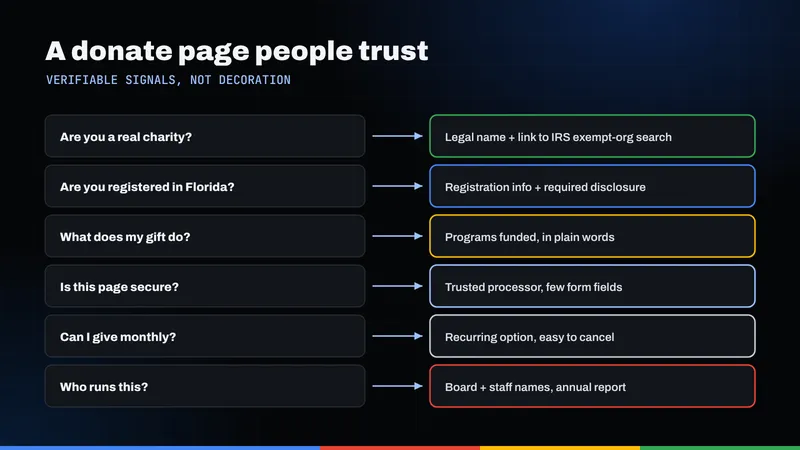
No-cost. Donors who don't know us are deciding whether we're real. Slogans don't settle that; facts they can check do.
1. Our IRS status, with a way to verify it
State our legal name and EIN, and tell donors they can look us up with the IRS Tax Exempt Organization Search. The IRS says that tool shows whether an organization is eligible to receive tax-deductible contributions (its Pub. 78 data), along with determination letters, Form 990-N e-Postcards and whether an organization's status was automatically revoked for not filing. "Doing business as" names aren't listed, so give donors our legal name. If our filings have lapsed, fix that first.
2. Our Florida registration and the required disclosure
This one isn't optional for most of us. Under Florida law, a charitable organization required to register must file with the Department of Agriculture and Consumer Services before soliciting and renew annually, unless it qualifies for an exemption (some small, volunteer-run groups do, but they still file information with the state). Section 496.411 of the Florida Statutes then requires a conspicuous disclosure on every solicitation, confirmation, receipt or reminder of a contribution. It begins "A COPY OF THE OFFICIAL REGISTRATION AND FINANCIAL INFORMATION MAY BE OBTAINED FROM THE DIVISION OF CONSUMER SERVICES" and ends "REGISTRATION DOES NOT IMPLY ENDORSEMENT, APPROVAL, OR RECOMMENDATION BY THE STATE."
The statute also requires the division's toll-free number and website to be included. For website solicitations, it says the statement must appear on any page that lists a mailing address for contributions, a phone number to process contributions, or online donation processing. Registered organizations must also conspicuously display their state registration number on printed solicitations, written confirmations, receipts and reminders. Ask our treasurer or counsel to confirm the exact wording and number with FDACS (1-800-HELP-FLA), then put it in the donation page footer and every email receipt.
3. Plain proof of what the money does
An impact page with numbers from our own records (meals served, students tutored) and a link to our latest Form 990 or annual report. Publish only figures we can stand behind.
4. A donation form that works
Few fields, a visible secure checkout, a clear recurring-gift option and an instant receipt. Slow or confusing on a phone means people leave. The piece on why beautiful websites fail to convert is worth a read before any redesign.
Should our site use nonprofit schema markup?
Low-cost. Yes, on the home page or About page, and it's a one-time job. Schema.org defines an NGO type, described simply as a non-governmental organization, which is a subtype of Organization. It supports a nonprofitStatus property that can take values such as Nonprofit501c3. Include our legal name, logo, address, phone, social profiles (as sameAs links) and nonprofit status, matching the Business Profile.
Markup won't make us rank by itself. It removes ambiguity about who we are, which helps when our name resembles another group's.
Is Google Ad Grants worth applying for?
No-cost, but it takes ongoing time. Google Ad Grants gives qualifying nonprofits up to $10,000 a month in search ads shown on Google.com. In the US, Google for Nonprofits currently requires IRS 501(c)(3) status (or a qualifying group exemption) plus partner verification, and excludes government entities, hospitals and schools, though their foundations may qualify.
Treat Ad Grants as a supplement to the pages described above, not a substitute. If no one can tend the account monthly, wait. Outside management, such as Ribacoff's Google Ads service, is an option if the board decides it's worth the spend.
How do we collect reviews and stories without crossing a line?
No-cost. Reviews matter to donors and volunteers checking us out. Ask for them honestly. Google's policy on user-contributed content prohibits reviews paid for directly or in kind, rewards for posting or removing reviews, discouraging negative reviews, selectively asking only happy people, and content based on a conflict of interest, which can include current or former employment. In practice:
- Ask everyone the same way: a card at the volunteer sign-in table, a line in the thank-you email. Don't offer raffle entries or T-shirts in exchange.
- Don't ask staff or board members to review us. Their connection is a conflict of interest.
- Respond politely to every review, including critical ones.
The Federal Trade Commission's 2024 final rule on fake reviews and testimonials bans fake or AI-generated reviews, paying for reviews conditioned on positive or negative sentiment, undisclosed insider reviews and review suppression through threats. Whether or not it reaches a particular nonprofit, it's the right standard for every testimonial we publish.
Protecting the people we serve
This is common sense, not law: the people who come to us for help did not sign up to be marketing. Before we publish any beneficiary's name, face, quote or story, get clear written consent, explain where it will appear, and make it easy to withdraw later. Never require a story in exchange for services. When in doubt, change names and details and say so. Take extra care with children, people in recovery, survivors of violence and anyone with immigration concerns.
What should we do in the next 90 days?
A plan a small staff and a few volunteers can carry out without new spending:
- Weeks 1–2: Claim or clean up the Google Business Profile. Confirm eligibility, name, category and hours. Add entrance photos (no identifiable clients).
- Weeks 3–6: Rewrite one page per program for people who need help, using the seven-point order above. Translate the most-used program page first.
- Weeks 5–8: Build the volunteer hub and role pages. Give the next public event its own page with Event markup.
- Weeks 7–10: Update the donation page: legal name, EIN, IRS lookup, Florida registration number and disclosure, and a working mobile form.
- Weeks 9–12: Add NGO schema, start a fair, consistent review request, and decide as a board whether to pursue Ad Grants.
If the board would rather hand the technical pieces to a professional, Ribacoff Enterprises offers local SEO and website work for organizations of every size, and will run a free audit of our site and listing so we know where we stand before we spend anything.
Frequently asked questions
Can a nonprofit without an office have a Google Business Profile?
Possibly. Google allows a service-area profile for organizations that serve people where they are, with one profile for a central office and a designated service area. A P.O. box or rented mailing address where you don't operate isn't eligible.
Do we need to put Florida's disclosure statement on our website?
If your organization is required to register or claims certain exemptions, section 496.411 of the Florida Statutes requires the disclosure on solicitations, and for websites it must appear on any page that lists a mailing address for contributions, a phone number to process contributions, or online donation processing. Confirm the exact wording and toll-free number with FDACS.
Can we use Event markup for weekly volunteer shifts or food pantry hours?
No. Google's Event guidelines say not to mark business hours as events, and events must be public, in person and on a page focused on that single event. Use it for a public cleanup day or festival; list recurring hours as plain text and on your Business Profile.
Is Google Ad Grants free money for any nonprofit?
No. In the US, Google for Nonprofits currently requires IRS 501(c)(3) status or a qualifying group exemption, plus verification by its validation partner, and it excludes government entities, hospitals and schools. The grant covers up to $10,000 a month in search ads, but the account needs regular management to be worthwhile.
Can we offer volunteers a prize for leaving us a Google review?
No. Google's policy prohibits reviews that are paid for directly or in kind and rewards for posting reviews, and it also bars selectively asking only satisfied people. Ask everyone the same way, offer nothing in return, and don't ask staff or board members to post reviews.