SEO for auto repair shops comes down to four things: a Google Business Profile that's filled out right, a separate page for each job you want more of, proof that you're legit (real reviews, real certifications, your Florida registration), and an estimate page that makes it easy to call. For a shop in North Miami Beach, that local work matters more than anything fancy. You can get the basics done in a month without learning a word of jargon.
Key takeaways
- Pick the most specific Google Business Profile category that describes what your shop is, then list every service you actually do.
- Build one page per job type (brakes, A/C, tires, collision, diagnostics) instead of one "Services" page that lists everything.
- Ask every customer for a review, the same way, with no discounts attached. Google's policy and the FTC's 2024 rule both draw hard lines here.
- Show credentials you can back up: ASE certifications your techs actually hold and your FDACS motor vehicle repair registration number.
- Your estimates page should explain how Florida's written estimate rules protect the customer. That builds trust and gets the phone ringing.
What does SEO actually mean for a repair shop?
Forget the buzzwords. Here's the whole idea in one sentence: when somebody's check engine light comes on in the Publix parking lot, you want your shop to be the one they find, trust, and call.
Auto repair SEO is the work of making that happen more often, mostly on two fronts: your Google Business Profile (the map listing with stars and a Call button) and your website.
Google has said plainly how it picks who shows up on the map. According to its own help page on how local ranking works, results are based mainly on relevance (do you match what they searched), distance (how close you are), and prominence (how well-known you are, which includes things like reviews and links). You can't move your shop. Relevance and prominence you can work on.
One more thing before we roll up the sleeves. North Miami Beach is its own city. It's not North Miami and it's not Miami Beach, so say "North Miami Beach" only where it's true. For the bigger picture, our North Miami Beach SEO page lays it out.
How should you set up your Google Business Profile?
Your Google Business Profile is the sign out front and the phone book listing rolled into one. Most shops set it up years ago and never touched it again. You can fix that in an afternoon.
Categories: say what you are, not everything you do
Google's guidelines for business categories are straightforward. Use as few categories as possible, pick the most specific one that fits, and choose categories that finish the sentence "This business IS a…" Google also says not to use categories as keywords.
So a mechanic picks the auto repair category that fits best, a body shop picks a body shop category, and a tire shop picks a tire category. Running two real businesses under one roof? Add a second. Just don't stack ten categories because you once did a transmission flush.
Services: list every job you actually do
Categories say what you are. Services say what you do. Google lets service businesses add suggested services and custom ones, group them, and add descriptions and prices. Go through it like an inventory count: brakes, A/C, diagnostics, tires, alignment. If you do it and want more of it, list it.
Hours: keep them honest
Nothing burns a customer faster than driving over on a Saturday because Google said you were open. Set regular hours, use special hours for holidays, and update the day something changes.
Photos: show the real shop
Skip stock photos. Post your building from the street, your bays, your techs at work, and finished jobs. Google wants photos sharp, well lit, and not heavily filtered.
Mobile mechanics, listen up. If you don't have a shop customers visit, Google treats you as a service-area business. That means you hide your home address and list the cities or ZIP codes you cover instead. Don't list a fake storefront. Google's rules say the address only belongs on your profile if customers are served there.
More detail lives in our Google Business Profile guide for North Miami Beach.
Why does every job type need its own page?
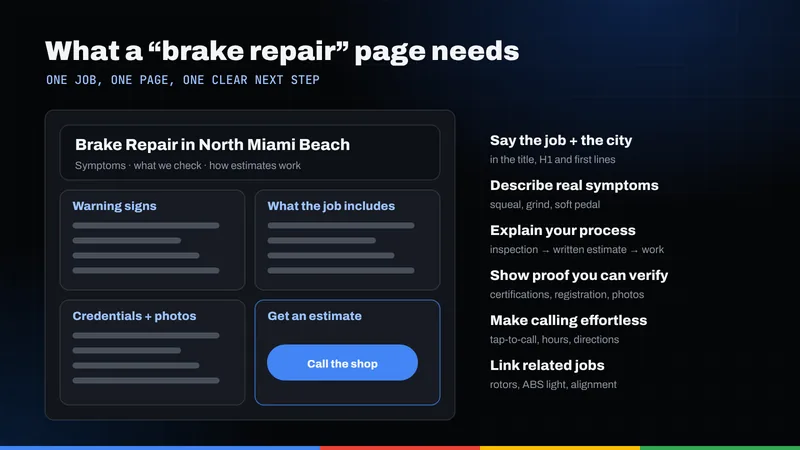
A lot of shop sites are a homepage, an About page, and a "Services" page listing twenty things. Then the owner wonders why nobody finds him for "brake repair." When someone searches for brake repair, Google wants to show a page about brake repair, not a page about everything.
So build a real page for each job you want more of. Each page should answer the questions a customer would ask you at the counter:
- What are the signs I need this?
- What do you actually do?
- How long does it usually take?
- How do your estimates work?
- What warranty do you give?
- How do I book?
A word about A/C in Miami heat
Anyone who's sat in South Florida traffic in August knows that a dead A/C isn't a comfort problem here. It's an emergency. That makes A/C repair one of the most natural pages for a South Florida shop to build.
You don't need to invent statistics to make that page work. Talk like you talk to customers: what warm air means, why a recharge isn't the fix if there's a leak, what you check, and how long a visit usually takes at your shop.
Which pages to build first
Use this table as a starting lineup. Build the ones that match work you want more of, not every row.
| Job type | Page to build | What to put on it |
|---|---|---|
| Brakes | Brake repair | Warning signs, pads vs. rotors, what your inspection covers, parts and labor warranty, "get an estimate" button |
| A/C | Auto A/C repair | Warm air symptoms, recharge vs. leak repair, what you test, typical turnaround at your shop |
| Check engine light | Engine diagnostics | What a scan tells you and what it doesn't, how your diagnostic fee works, what happens after |
| Tires | Tires and alignment | Brands you stock, mounting and balancing, alignment, Florida's per-tire fee disclosed up front |
| Collision | Collision and body repair | How you handle insurance claims, paint matching, photos of your booth and real finished work |
| Mobile service | Mobile mechanic service | Cities or ZIP codes you cover, jobs you can do on-site vs. jobs that need a lift, how to book |
For the nuts and bolts of building pages that rank in a specific city, see what makes a website rank locally.
What is AutoRepair schema, and do you need it?
Schema is a small block of code that tells search engines your name, address, phone, and hours in a format they don't have to guess at. Customers never see it. Google reads it.
There's a specific type made for shops like yours. On schema.org, AutoRepair is defined simply as "Car repair business," and it sits under AutomotiveBusiness, which sits under LocalBusiness. Google's own local business structured data guide says to use the most specific LocalBusiness subtype possible. For a repair shop, AutoRepair is it.
What to include, at minimum:
- Business name and full street address (Google lists these as required)
- Phone number and website URL
- Opening hours that match your Google Business Profile exactly
- Latitude and longitude of your shop
Two honest warnings. First, schema doesn't guarantee anything. Google says outright that it doesn't promise structured data will produce special search features. Second, your schema has to match reality. Our post on how schema helps search engines covers this in plain English.
How do you get more reviews without getting in trouble?
Reviews are the internet's word of mouth. Google says more reviews and positive ratings can help your local ranking, and that replying shows customers you value their feedback. This is also where shops get themselves in hot water.
What Google won't allow
Google's policy on prohibited and restricted content spells it out. Businesses can't offer incentives (payment, discounts, free goods or services) in exchange for reviews. They can't discourage negative reviews or only ask happy customers, and reviews from employees or anyone with a conflict of interest get removed.
What the FTC won't allow
In August 2024, the Federal Trade Commission announced a final rule banning fake reviews and testimonials. It prohibits fake reviews (including AI-written ones), paying for reviews that have to be positive or negative, undisclosed reviews from insiders like employees and relatives, and using threats or intimidation to get bad reviews taken down. The FTC can seek civil penalties against people who knowingly break it.
What to do instead
Keep it boring and consistent. Boring is legal.
- Ask every customer, not just the ones who smiled at pickup.
- Send a text or email with your review link after the job, so nobody feels cornered at the counter.
- Don't offer a free oil change or a discount for leaving a review. Ever.
- Reply to every review, good and bad. Stay calm on the bad ones.
- Never write reviews for yourself, and don't let your nephew do it either.
Which credentials should your website show?
People are nervous about mechanics. Your website's job is to calm that nerve with proof, not adjectives. "Honest and trustworthy" means nothing. A certification number means something.
ASE certification
According to ASE, the National Institute for Automotive Service Excellence is an independent nonprofit formed by the industry in 1972. Getting ASE certified takes a combination of hands-on work experience and passing a test, and certifications must be renewed every five years. ASE also recognizes shops where at least 75% of employees are ASE certified as Blue Seal of Excellence shops.
If your techs hold ASE certifications, say so, and say which areas (brakes, A/C, engine performance, and so on). If you're not a Blue Seal shop, don't use the logo. Simple rule: if you can't show the certificate, don't put it on the site.
Your FDACS motor vehicle repair registration
Under section 559.904 of the Florida Statutes, every motor vehicle repair shop has to register with the Florida Department of Agriculture and Consumer Services (FDACS) before doing business in the state, and the registration renews every two years. The department issues a certificate with a registration number, and that number is required on your invoices.
Put your registration number in your website footer and on your estimates page. It costs nothing, and it's a fact a nervous customer can check.
What makes a quotes and estimates page convert?
Customers don't want to "contact" you. They want to know what it'll cost and whether they'll get ripped off. Give them a page that answers both.
Lean on Florida's estimate law
Here's something worth telling customers. Under section 559.905 of the Florida Statutes, when a customer requests repair work that will cost more than $150, the shop must prepare a written estimate. The customer signs a form choosing whether they want a written estimate, don't want one as long as costs stay under a dollar amount they set, or don't want one at all. If they set a limit, the shop can't go over it without the customer's written or oral approval.
Explaining that on your site does two things. It shows you know the rules, and it tells a nervous customer they're protected.
What to put on the page
- A short form with name, phone, year, make, model, and "what's going on with the car."
- A click-to-call button that works on phones.
- How your estimates work, in plain steps: they bring it in, you diagnose, you call with a written estimate, nothing gets done without their OK.
- Your diagnostic fee and warranty, stated plainly.
- Your FDACS registration number and ASE certifications, right there.
- Tire and battery fees disclosed if you sell them, so nobody feels nickel-and-dimed at checkout.
If your site looks great but the phone still doesn't ring, that's a conversion problem, not a design problem. We wrote about exactly that in why beautiful websites fail to convert, and it's the focus of our conversion optimization work.
What's a realistic 30-day plan?
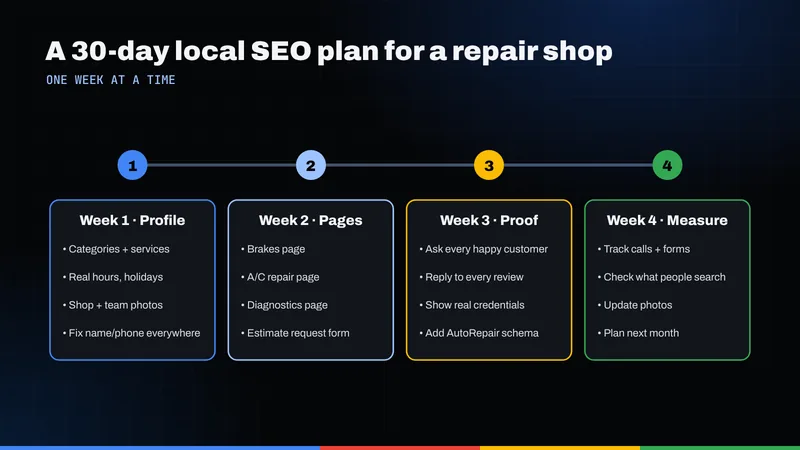
Here's a 30-day plan you can work through between oil changes.
- Days 1–3: Claim and clean up your Google Business Profile. Make sure you can log in. Fix your name, address, phone, and hours so they match your shop sign and website exactly.
- Days 4–5: Fix your categories. One primary category that says what you are. A second only if you truly run a second kind of business.
- Days 6–8: Add every service. Walk the shop floor if you have to. Write a one-line description for each.
- Days 9–10: Shoot real photos. Storefront, bays, team, finished jobs.
- Days 11–14: Write your first two service pages. Start with the jobs you want more of, like brakes or A/C.
- Days 15–17: Build or fix your estimates page. Short form, click-to-call, how estimates work, your FDACS number.
- Days 18–19: Add AutoRepair schema. Have your web person add it, or use a plugin, and make sure the hours match your profile.
- Days 20–22: Set up a review routine. A text template, sent to every customer after pickup. No incentives. Then reply to every review you already have.
- Days 23–27: Write two more service pages. Diagnostics, tires, collision, whatever fits your shop.
- Days 28–30: Check your work. Search for your shop on your phone, tap call, and fill out your own form. Fix whatever's broken.
Will you be at the top of the map on day 31? Probably not, and anybody who promises that is selling something. SEO builds over months, not days. Our post on how long SEO takes gives an honest look at timelines.
When should a shop get outside help?
Owners who search "SEO Miami" or "local SEO Miami" looking for help usually find a wall of promises. Here's the honest version: plenty of owners can handle the 30-day plan themselves. It's like changing your own oil: doable if you have the time. The harder part is the ongoing stuff: new pages, a fresh profile, weekly reviews, and tracking what's working.
That's what our local SEO service is built for. You can see the kind of sites we build in our portfolio. If you'd like a second set of eyes before you decide anything, request a free audit and we'll tell you what we'd fix first. Or call us at 516-510-5964. No jargon, promise.
Frequently asked questions
What's the difference between SEO for auto repair shops and regular SEO?
The basics are the same, but repair shops live and die by local search. That means your Google Business Profile, your reviews, and pages for each specific job matter more than broad content.
Should a body shop and a mechanical shop use different Google categories?
Yes. Google says to pick the most specific category that describes what your business is, and to use as few as possible. A body shop should lead with a body shop category, a general mechanic with an auto repair category. Only add a second category if you truly run both kinds of business.
Can I give customers a discount for leaving a Google review?
No. Google's policy prohibits offering incentives such as payment, discounts, or free services in exchange for reviews. The FTC's 2024 rule also bans paying for reviews that are required to be positive or negative. Ask every customer the same way, with nothing attached.
Do Florida repair shops have to give written estimates?
Under section 559.905 of the Florida Statutes, a shop must prepare a written estimate when a customer requests repair work expected to cost more than $150. The customer signs a form choosing whether they want one, and can set a dollar limit the shop can't exceed without their approval. Explaining this on your website builds trust.
How should a mobile mechanic set up a Google Business Profile?
If customers don't come to your address, Google treats you as a service-area business. Remove your address from the profile and list the cities or ZIP codes you serve instead, up to 20 service areas. Don't list a fake storefront; Google says the address belongs on the profile only if you serve customers there.